Finally – the initial release of the 3ds Max 2027 compatible Outliner version !
This project brings the great but deprecated original Outliner 2.0 to modern versions of 3ds Max.
The original Outliner by P.J. Janssen has been a reliable workhorse in Max for many years in the past,
but stopped working with newer 3ds Max versions a long time ago ( around 3ds Max 2015).
This has changed now !
While i have released several compatibility fixes overtime, removal of the legacy keyboard shortcut system
and the introduction of .NET 8 with 3ds Max 2026 required a more extensive rewrite.
Outliner2-SF is the result of this effort and restores compatibility with modern 3ds Max versions ( up to 2027 ).
I hope this tool still provides some value to the 3ds Max community !
- Compatible from 3ds Max 2016 up to 3ds Max 2027
- Pure 3ds Max built-in layer hierarchy mechanism
No more whacky global, scene attached Custom Attributes for Layer hierarchy - Full compatibility with 3ds Max installations without Outliner installed
- New Icon sets ( Scene Explorer style, higher resolutions )
- Transparent 3ds Max hotkey pass-through
Free download at the bottom of this page!
The complete project source is hosted on my github account
https://github.com/FrogsInSpace/Outliner2-SF
Feedback in the comments please !!! Thanks !
Outliner2-SF – Outliner for current 3ds Max
3ds Max 2016 – 3ds Max 2027
The famous scene manager for 3ds Max – now compatible with curent 3ds Max versions !
- • 3ds Max 2016 – 2027 compatible.
- • Pure 3ds Max layer hierarchy.
- • No scene side effects !
- • New icons, higher resolution.
- • and more …
Please consider a donation for future improvements!

Donations: buymeacoffee.com
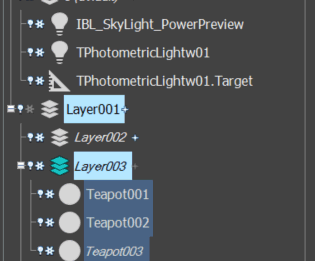
Amazing work! Only issue I have is readability with the icons and text stuff. Here is a screenshot link.
Max’s default layer view is much easier to read for me. The even/odd row differences, the icon spacing (arrow works better than Plus, eye better than lightbulb). I chose the SceneExplorer 20 size but its to small and the 32 is too big. Would it be possible to add a User Interface option that just copies/reuses max when it comes to these couple things?
Thank you!
https://imgur.com/a/UGZAp1H
If it adds something usefull i am all for it. +1
Yes please, very interested
Yes! it’s looking very nice! Publish it asap!
Hi! I’ve been waiting a long time for someone to take on the development of this script. I had to use the native 3ds Max 2026 manager for a year and a half, and now — a miracle! Thank you so much. I hope the product continues to grow and get updates.
Need it on 2025!
Outliner 2 Was better and faster and easer than built in.
Its working on Max 2025, so i got you covered 🙂